

I am working on a grid that has 3 requirements that seem to cause the bug:
- A FK column must have its lookup values loaded remotely
- The grid has sticky columns
- The grid is loaded inside a tab strip control
The combination of these 3 factors causes the grid not to load and results in a devtools console error. It's worth noting that removing any of the 3 bullet points above (e.g. NOT using sticky columns, NOT loading grid in tab control, or NOT have a remote FK column) allows the grid to load properly.
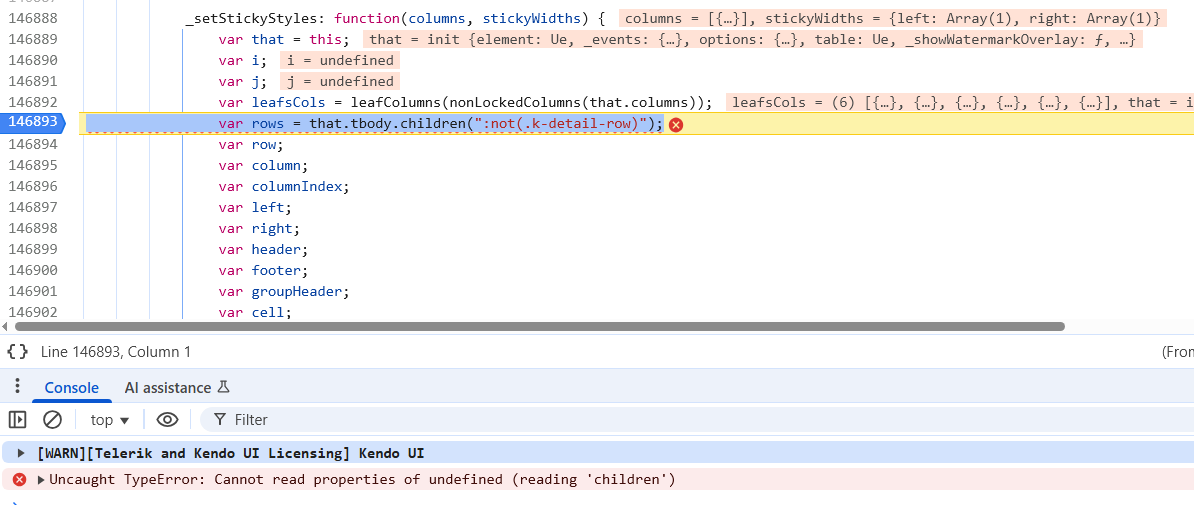
The error thrown in the DevTools console indicates that the grid's "tbody" property is not created at the time it is trying to call _setStickyStyles.
Before error is thrown (mouse is hovering over "tbody" property):

After error is thrown (look at console output):
I have upload a zip file containing a sample project that demonstrates the issue. When you launch the sample application, there are 2 links at the top of the page, "No Tabs" and "Tabs". The issue is reproducible on the "Tabs" page. Both pages use the same grid partial, but the "Tabs" page loads the partial through the tabstrip with a controller action. The "Tabs" page includes the 3 bullet points I indicated above that cause the problem.
The workaround I am using for now in my application is to NOT set the columns as sticky in my partial view. Instead, I set the sticky columns using the grid's API method "stickColumn" (https://www.telerik.com/kendo-jquery-ui/documentation/api/javascript/ui/grid/methods/stickcolumn) during the grid's dataBinding event (to ensure sticky columns are set AFTER grid initialization). This allows the grid to load and sets the sticky columns appropriately.
Thank you!
According the the documentation a user should be able to use the keyboard to navigate out of the spreadsheet as deescribed here. However, this does not happen.
Steps to reproduce:
- Open the Dojo - https://dojo.telerik.com/IvdWHNwo/2
- Navigate or click in the last cell in the last row
- Click Tab key.
Current behavior: The focus remains in the same cell.
Expected behavior: Teh second input should be focused.
The issue is a regression starting with version 2024.4.1112
Bug report
When a custom bundle is created the kendo.aspnetmvc script is not placed on the correct order. Thus, in some scenarios errors occur. For example if a custom kendo script is created using the following kendo-config.json and MultiColumnComboBox is used with ServerFiltering enabled and error will be thrown:
{
  "version": "2026.2.520",
  "components": [
    {
      "file": "kendo.aspnetmvc.js",
      "features": []
    },
    {
      "file": "kendo.dropdownlist.js",
      "features": []
    },
    {
      "file": "kendo.multicolumncombobox.js",
      "features": []
    }
  ]
}
Reproduction of the problem
- Run the attached sample. In the sample a custom bundle as explained above is used. TelerikAspNetCoreApp1.zip

- Try to select values in the DropDownList or MultiColumnCombobox
Current behavior
The bundle builder allows kendo.aspnetmvc.js to run before the widgets whose UI for ASP.NET Core helpers it augments. The data in the components is not filtered and the following error is thrown:
Uncaught TypeError: kendo.ui.MultiColumnComboBox.requestData is not a function
Expected/desired behavior
The kendo.aspnetmvc.js schould be ordered correctly by the custom script builder, so errors to be avoided and the components to work as expected.
TicketID:
1716198
Environment
- Kendo/Telerik version: 2026.2.520
- Browser: [all ]
Add first-class Save/Load layout tools to the Grid toolbar that persist and restore Grid state without custom wiring. The default provider should use localStorage, with an extensibility point to plug in server storage. Users should be able to:
- Save multiple named layouts (columns/order/visibility, sorting, filtering, grouping, paging, search panel state).
- Open a built-in popup to manage layouts (save as, rename, delete, set default) and load a selected layout.
- Choose storage scope per layout (local vs. server) with a simple toggle; the server provider API can be implemented by the app.
Behavior and scope
- Persist and restore via an internal provider abstraction; ship a default localStorage provider and document a server provider interface.
- Support full or partial restores; allow picking which parts to include (for example, only columns/layout vs. full DataSource state) to align with existing guidance on selectively applying options through `setOptions({ ... })` and DataSource APIs like `dataSource.filter(...)` [1] [2] [3] [4].
- Avoid double reads and support automatic persistence flows similar to the documented beforeunload/ready pattern; native implementation should mirror the current best-practice approach that saves on leave and restores on load, with an option to disable automatic behavior when using explicit Save/Load actions [2] [5].
- Respect known constraints for SignalR binding by restoring layout via `setOptions({ columns, ... })` and reapplying data state via DataSource methods to keep the hub connection intact; provide an out-of-the-box “SignalR-safe” mode that applies filters/sort/page through DataSource APIs [1] [3] [4].
- Include search box value persistence and ensure multi-check filter lists load their full option sets when state is restored, consistent with existing recommendations to persist search input and configure filter DataSources [6].
Developer experience
- New built-in toolbar tools: “Save Layout,” “Load Layout,” and “Manage Layouts…”, plus a public API to trigger the same actions programmatically [7] [8].
- Config options to:
- Enable the feature and set a default storage provider (local or custom).
- Define which state segments to include (columns, sorting, filtering, grouping, paging, search).
- Provide hooks/events for pre-save, post-save, pre-load, post-load to modify payloads or enforce policies.
- A documented provider interface for custom storage so apps can store/retrieve named layouts from a server.
Rationale
- State persistence is officially supported via `getOptions()`/`setOptions()` and is commonly implemented with localStorage and beforeunload/ready flows, but requires custom buttons and wiring today [2] [5].
- Partial restore and DataSource API reapplication are established practices to handle limitations such as SignalR-bound grids where full `setOptions()` is not viable; the feature should codify these patterns into a turnkey, user-facing experience [1] [3] [4].
- Developers frequently need to persist search input and ensure multi-check filter option lists are correct after restore; including these in first-party behavior reduces extra glue code [6].
Requested deliverables
- Built-in toolbar Save/Load/Manage UI with a popup for multiple named layouts and defaults.
- Default localStorage provider; extensible provider model for server storage.
- Options to scope which state is saved/restored and a SignalR-safe mode.
- Public API and events for integration and policy control.
- Docs and demos covering automatic and manual flows, local vs. server storage, and SignalR scenarios.
[1] [3] [4] [2] [5] [6] [7] [8]
[1]: https://www.telerik.com/forums/localstorage-persistence-not-working-with-kendo-grid
[2]: https://www.telerik.com/aspnet-core-ui/documentation/knowledge-base/grid-automatically-persist-state
[3]: https://www.telerik.com/forums/localstorage-persistence-not-working-with-kendo-grid
[4]: https://www.telerik.com/forums/localstorage-persistence-not-working-with-kendo-grid
[5]: https://www.telerik.com/aspnet-core-ui/documentation/knowledge-base/grid-automatically-persist-state
[6]: https://www.telerik.com/forums/grid-state-persistance-with-column-filters-or-search-bar
[7]: https://www.telerik.com/aspnet-core-ui/documentation/html-helpers/data-management/grid/overview
[8]: https://www.telerik.com/aspnet-core-ui/documentation/html-helpers/data-management/grid/toolbar