

When using the new Office 2019 Light theme in the SyntaxEditor there are no scrollbars displayed in the CompletionList window. Also the list is not scrollable using the scrollwheel. Only when using the arrows on the keyboard.
When using the fluent theme it is working fine.
See attached screenshots.
The component itself seems to work fine with DPI scaling except for the search/find functionality. When you search for some text and click to go to the first instance it finds, the actual text is off-screen, though it is highlighted correctly (when you scroll down you can see it highlighted).
This is easy to replicate by changing the Windows display scale to anything other than 100%.
Use the following code in the project:
    Private Sub btnToggleWW_Click(sender As Object, e As EventArgs) Handles btnToggleWW.Click
        RadSyntaxEditor1.IsWordWrapEnabled = Not RadSyntaxEditor1.IsWordWrapEnabled
        Me.Text = RadSyntaxEditor1.IsWordWrapEnabled.ToString()

    End Sub
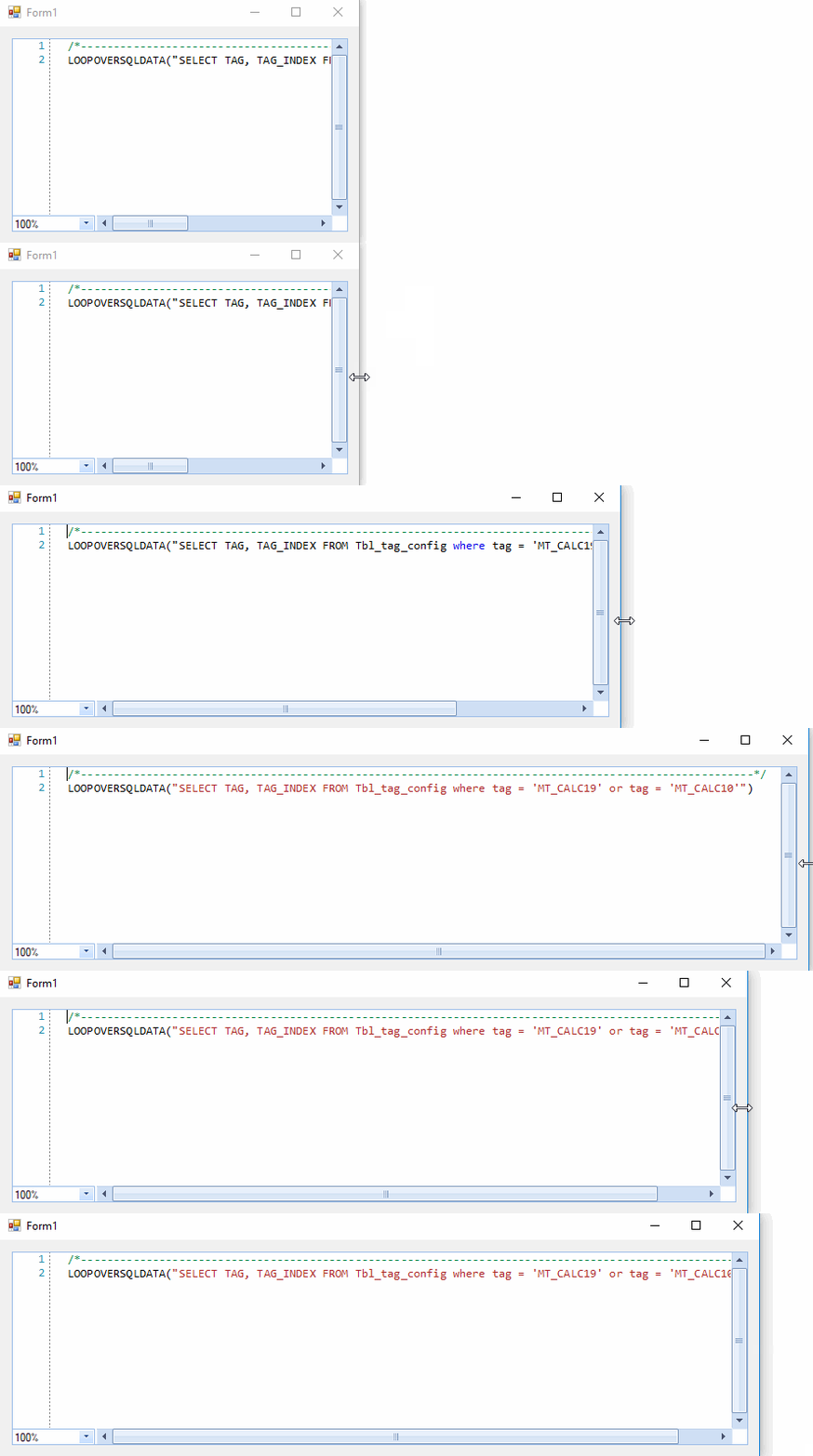
When you enable the word wrapping, the horizontal scrollbar is collapsed:

However, when the word wrapping is disabled, the scrollbar doesn't reappear anymore:

This is an odd one - see attached GIF.
If I attempt to select characters with the mouse (left-click + drag), at the beginning of any line of text, it won't highlight (90+% of the time). That's if I'm dragging from left-to-right.
If I select the same text from right-to-left, it works every time.
Setting the SyntaxEditorElement.IsReadOnly property to true disables editing the text inside RadSyntaxEditor. However, when opening the Find and Replace dialog, the user is still allowed to replace the text and thus change the content in the document. This shouldn't be allowed when the control is in read-only mode.
Workaround:
            this.radSyntaxEditor1.SyntaxEditorElement.InputHandler = new MyInputBehavior(this.radSyntaxEditor1.SyntaxEditorElement);

        public class MyInputBehavior : SyntaxEditorInputBehavior
        {
            public MyInputBehavior(RadSyntaxEditorElement editor) : base(editor)
            {

            }

            protected override void PerformOpenFileDialog(KeyEventArgs e)
            {
                this.SyntaxEditor.SearchPanel.ReplaceAllButton.Enabled = false;
                this.SyntaxEditor.SearchPanel.ReplaceButton.Enabled = false;
                this.SyntaxEditor.SearchPanel.ReplaceTextBox.Enabled = false;
                base.PerformOpenFileDialog(e);
            }
        }
When I setup and OverloadList, the OverloadListWindow follows the cursor and can move off screen so the user can't see/read the information that is presented.

Workaround: adjust the position of the overload window when it is shown:

            this.radSyntaxEditor1.SyntaxEditorElement.IntelliPrompts.OverloadListWindow.VisibleChanged+=OverloadListWindow_VisibleChanged;

        private void OverloadListWindow_VisibleChanged(object sender, EventArgs e)
        {
           ShapedForm f = sender as ShapedForm;
            Screen myScreen = Screen.FromControl(this);
            Rectangle area = myScreen.WorkingArea;
            if (f.Left + f.Width > area.Width)
            {
                f.Left = area.Width - f.Width -5;
            }
        }


Change the NumbersColor at design time:
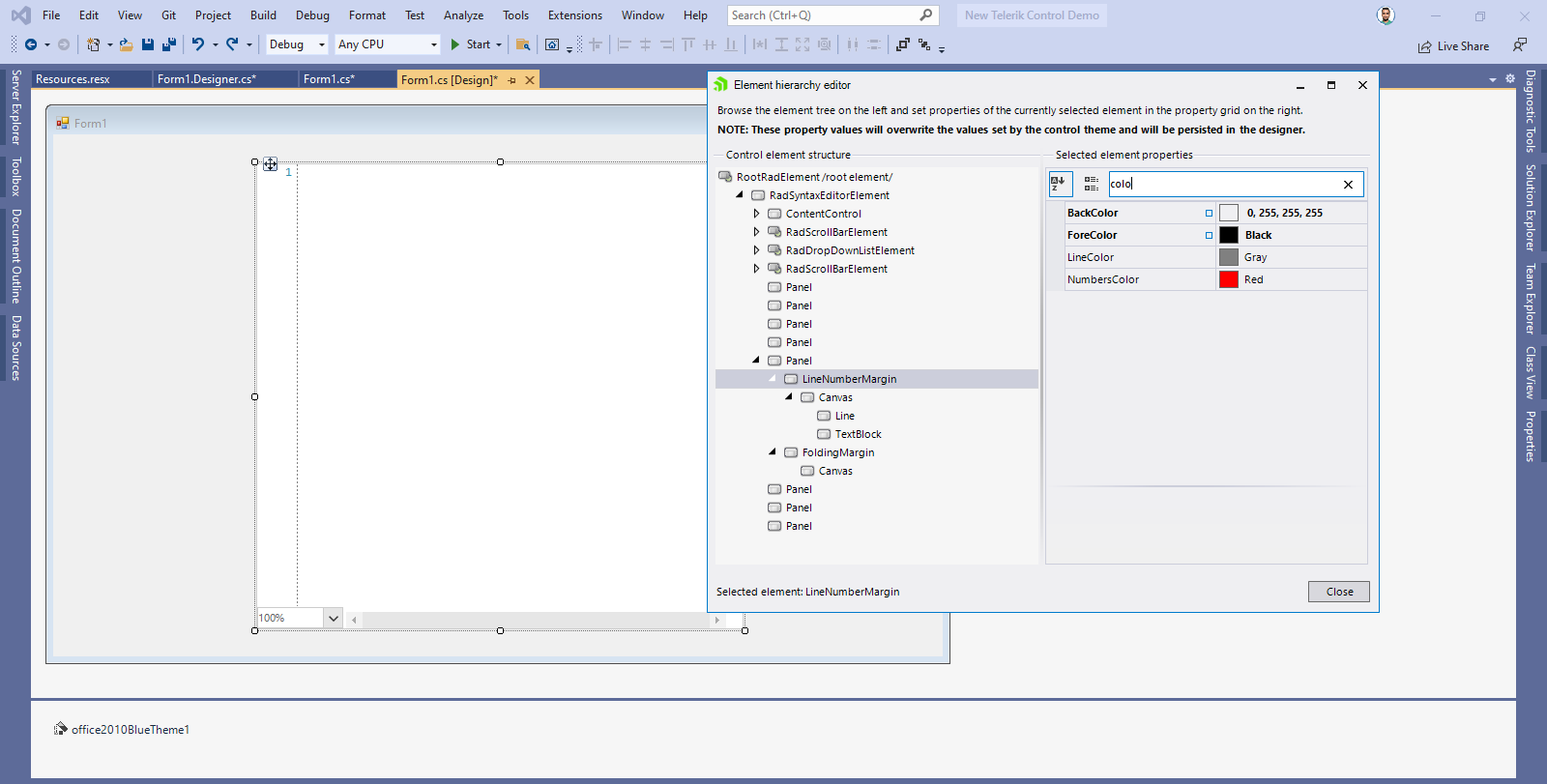
Run the application:
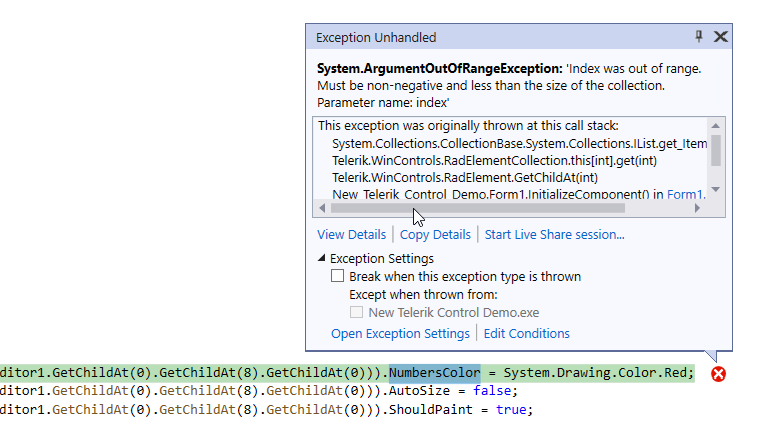
Workaround: move this code in the Form.Load event
If my xml string contains an element with attributes, XMLFoldingTagger just ignores it!
For example:
<Formular DebugMode="F" Version="1" Typ="Rechnung">
<OtherElements/>
<Formular/>
is ignored. Element Formular is not recognized by the XMLFoldingTagger. Only simple elements are recognized, like:
<Formular>
<OtherElements/>
<Formular/>
Please refer to the attached gif file.
Workaround: set bottom padding by setting the SyntaxEditorElement.HorizontalScrollBar.Padding property.
mySyntaxEditor1.SyntaxEditorElement.HorizontalScrollBar.Padding = new Padding(0, 0, 0, 2);
XMLFoldingTagger is not documented. Neither here: https://docs.telerik.com/devtools/winforms/controls/syntax-editor/features/taggers/overview nor here: https://docs.telerik.com/devtools/winforms/controls/syntax-editor/features/taggers/folding-taggers.
XmlFoldingTagger throws while entering XML. When closing the root tag on the next line, the Tagger throws once you enter the '/' (before.png -> after.png).
Adding a second opening tag and converting it to closing by inserting the '/' afterwards works.
When adding a child tag, the tagger offers to fold the unfinished tag against the root closing tag, and throws if you try to do so.

using System;using System.Windows.Forms;using Telerik.WinForms.Controls.SyntaxEditor.UI;using Telerik.WinForms.Controls.SyntaxEditor.UI.IntelliPrompt.Overloading;namespace WindowsFormsApp1{ public partial class Form1 : Form { public Form1() { InitializeComponent(); OverloadInfoCollection overloadListA = new OverloadInfoCollection { new OverloadInfo("aaa", "aaa description") }; this.radSyntaxEditor1.SyntaxEditorElement.IntelliPrompts.OverloadListWindow.Presenter.OverloadListItems = overloadListA; } private void btnClear_Click(object sender, EventArgs e) { this.radSyntaxEditor1.SyntaxEditorElement.IntelliPrompts.OverloadListWindow.Presenter.OverloadListItems.Clear(); } private void btnChange_Click(object sender, EventArgs e) { OverloadInfoCollection overloadListB = new OverloadInfoCollection { new OverloadInfo("bbb", "bbb description") }; OverloadListPopup overloadListWindow = this.radSyntaxEditor1.SyntaxEditorElement.IntelliPrompts.OverloadListWindow; overloadListWindow.Presenter.OverloadListItems = overloadListB; overloadListWindow.Refresh(); } private void radButton1_Click(object sender, EventArgs e) { OverloadInfoCollection overloadListC = new OverloadInfoCollection { new OverloadInfo("ccc", "ccc description"), new OverloadInfo("ccc 1", "ccc 1 description") }; this.radSyntaxEditor1.SyntaxEditorElement.IntelliPrompts.OverloadListWindow.Presenter.OverloadListItems = overloadListC; } private void radSyntaxEditor1_DocumentContentChanged(object sender, Telerik.WinForms.SyntaxEditor.Core.Text.TextContentChangedEventArgs e) { this.radSyntaxEditor1.SyntaxEditorElement.IntelliPrompts.OverloadListWindow.Show(); } }}
Hi Team , I want to make my syntax editor readonly and user should not be able to make any changes.
I have made my
((Telerik.WinControls.UI.RadSyntaxEditorElement)(this.radSyntaxEditor.GetChildAt(0))).IsReadOnly = true; .
But still the user is able to delete the data by pressing delete button .
How can we restrict this.
I also tried radSyntaxEditor.enabled=false. It disables editing but the are is greyed out.
Thanks
A programmatically created selection keeps highlighting the following part of the text when its original content is deleted via keyboard.
If there are less characters left than the selection encompassed, further editing will result in unhandled Exceptions.
Steps to reproduce:
- Enter multiple lines of text in RadSyntaxEditor
- Programmatically set Selection.
- Press [Del] or [Backspace] or [Ctrl-X] to remove the selected Text.
I'm trying to use the new RadSyntaxEditor in a popup editor and I'm having issues and questions. I'm using it in a component built in code that is used to edit a SQL Query from a grid cell double click. It seems to work except when I press enter to insert a new line it does not do that, instead the default form button is fired to close the form. Note that I can launch the form to either show a multi-line textbox or a RadSyntaxEditor depending on the input parameters. It works perfectly with the textbox. The issue is with the RadSyntaxEditor
I also have the following questions:
I cannot find any documentation on loading text into the RadSyntaxEditor is my code correct for this?
I cannot find any documentation regarding the Document property - where do I find that?
I cannot find anything on how to get the text out of the RadSyntaxEditor when I'm done. Is my code correct on this?
Here are my code snippets:
        private void GvMrgLtr_CellDoubleClick(object sender, EventArgs e)
        {
            var m = MethodBase.GetCurrentMethod();
            try
            {
                if (sender is HostedTextBoxBase sndr)
                    sndr.Text = MemoDialog.ShowDialog(sndr.Text, "Edit", 0, false, false, true);
            }
            catch (Exception ex)
            {
                MessageBox.Show($@"{m.Name} : {ex}");
                Log.Error(ex, m.Name);
            }
        }
using System.Windows.Forms;
using Telerik.WinControls.UI;
using Telerik.WinForms.Controls.SyntaxEditor.Taggers;
using Telerik.WinForms.SyntaxEditor.Core.Text;

namespace P3CMS.Components
{
    internal static class MemoDialog
    {
        public static string ShowDialog(string text, string caption, int maxLength = 0,
            bool ro = false, bool spellcheck = true, bool sqlSyntaxHighlight = false)
        {
            var originalText = text;

            var memoDialogForm = new RadForm
            {
                Width = 500,
                Height = 700,
                FormBorderStyle = FormBorderStyle.Sizable,
                Text = caption,
                StartPosition = FormStartPosition.CenterScreen
            };

            var textBox = new RadTextBox
            {
                Left = 50,
                Top = 40,
                Width = 400,
                Dock = DockStyle.Fill,
                Multiline = true,
                AcceptsReturn = true,
                Text = text,
                ScrollBars = ScrollBars.Both,
                MaxLength = maxLength,
                ReadOnly = ro
            };

            var textDocument = new TextDocument(text);
            var radSyntaxEditor = new RadSyntaxEditor
            {
                Left = 50,
                Top = 40,
                Width = 400,
                Dock = DockStyle.Fill,
                Document = textDocument
            };

            var tagger = new SqlTagger(radSyntaxEditor.SyntaxEditorElement);
            radSyntaxEditor.TaggersRegistry.RegisterTagger(tagger);

            var checker = new RadSpellChecker { AutoSpellCheckControl = textBox };
            if (!spellcheck)
                checker.AutoSpellCheckControl = null;

            var bottomPanel = new RadPanel { Height = 60, Dock = DockStyle.Bottom };
            var confirmation = new RadButton
            { Text = @"Ok", Left = 50, Width = 100, Top = 8, DialogResult = DialogResult.OK };
            var cancel = new RadButton
            { Text = @"Cancel", Left = 200, Width = 100, Top = 8, DialogResult = DialogResult.Cancel };

            confirmation.Click += (sender, e) => { memoDialogForm.Close(); };

            if (sqlSyntaxHighlight)
                memoDialogForm.Controls.Add(radSyntaxEditor);
            else
                memoDialogForm.Controls.Add(textBox);
            memoDialogForm.Controls.Add(bottomPanel);
            bottomPanel.Controls.Add(confirmation);
            bottomPanel.Controls.Add(cancel);
            memoDialogForm.AcceptButton = confirmation;
            memoDialogForm.CancelButton = cancel;

            if (!sqlSyntaxHighlight)
                textBox.Select(0, 0);

            return memoDialogForm.ShowDialog() == DialogResult.OK
                ? sqlSyntaxHighlight ? textDocument.CurrentSnapshot.GetText() : textBox.Text
                : originalText;
        }
    }
}