

In Web Report Designer HtmlTextBox input is just simple TextArea. There is a great need to be able to enter rich text as in a desktop application.
https://docs.telerik.com/reporting/report-items/htmltextbox/overview

I have a following default code in a html file for a web designer.
$(document).ready(function () {
$("#webReportDesigner").telerik_WebReportDesigner({
persistSession: false,
toolboxArea: {
layout: "list"
},
serviceUrl: "some url",
report: "some_report_name",
}).data("telerik_WebDesigner");
});
I have also a custom report storage implemented from IDefinitionStorage, where I have a GetDefinition("some_report_name") method implemented in a custom way. In order to do that, I need to send additional parameters from a web designer (html code provided previously) but don't know how to do that.
For example, I need to open SalesInvoice.trdx file and I do a following: report: "SalesInvoice.trdx". If i need to send additional parameter, let's say some kind of token, there is no good place to send it. As a work around, i am doing report: "SalesInvoice.trdx&token=123". The problem with this, it is appearing in a title of a web designer and I don't want that. In an attachments, there is a screenshot where it looks good with a simple name and the one which has a token in it.
So, the question is, can I send other parameters as well from a client side of web designer to the server like parameters or so?
In a HTML5 ReportViewer we can send report file name and parameters as a reportSource like this:
serviceUrl: serviceUrl,
reportSource: {
report: reportUrl,
parameters: reportParams,
Can we do the same? Or how can I do that?
What's the long-term plan for supporting Linux and Telerik Reporting? The dotnet design team is looking to remove support for System.Drawing.Common on Linux platforms. They're recommending compiler warnings in .Net 6, and full PlatformNotSupportedExceptions in .Net7
Sources:
designs/system-drawing-win-only.md at main · dotnet/designs (github.com)
Breaking change: System.Drawing.Common only supported on Windows - .NET | Microsoft Docs

Hello,
We use WebServiceDataSource with OData query in our reports. Sometimes OData can through an exception.
In our case, we have added Web Service DataSource and set this OData query for its Service Url:
https://services.odata.org/V3/Northwind/Northwind.svc/Products(1)?$select=ProductName1
If you see the query, it is selecting "ProductName1" property of "Product #1". But "ProductName1" property does not exist (correct property name is "ProductName"). When we use Postman for the OData query above, it shows an error which you can see from attached picture (ErrorWhenWeUsePostman.PNG, "Could not find a property named 'ProductName1' on type 'NorthwindModel.Product'"). From the second picture (TelerikReportingGeneralError.PNG, "An error has occurred... Response status code does not indicate success: 400 (Bad Request).") you can see the result of our test report (in html5 report viewer) that has the same OData query.
The question is when we preview our report (in html5 report viewer) how can we show the error message that OData sent instead of showing Telerik reporting general error?
Instead of this message:
An error has occurred while processing Report 'TestReportWithWebServiceDataSource': Response status code does not indicate success: 400 (Bad Request).
This OData error message should be handled and shown on browser (html5 report viewer) when previewing report:
Could not find a property named 'ProductName1' on type 'NorthwindModel.Product'
FYI: We are using Telerik Reporting version 15.0.21.224.
This is my post on Telerik forum related with this: How to get internal error message from Custom Report Resolver
Thank you,

In .NET Core the localization routines have changed and the approach to localize an application provided in the documentation doesn't work.
When adding the localized .resx files as described in the documentation - with BuildAction set to None - the resource strings cannot be obtained and even the default string values are lost. This effect can be mitigated with changing the BuildAction to EmbeddedResource.
In the Desktop Report Designers, you may display the Text of the Tooltips on several lines by adding new lines (\n) inside the text.
In the HTML5 Viewrs, the new lines are ignored and the text is displayed on a single line. You may work around this by replacing the new lines with <br /> elements. It would be much easier for the users if this is done in the code of the viewer instead.
In desktop app we have some space with description
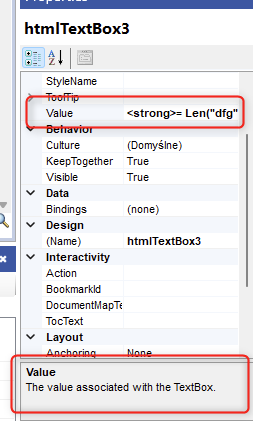
In web designer it would be nice to show some info in tooltip or another way like you prefer

The OpenXML renderings in .NET work with DocumentFormat.OpenXml 2.7.2 - 2.20.0
When upgrading to version 3.0.0 the Word rendering throws the following exception:
CSharp.Net7.Html5IntegrationDemo Error: 0 : System.TypeInitializationException: The type initializer for 'Telerik.Reporting.OpenXmlRendering.Wordprocessing.DocumentHelper' threw an exception.
 ---> System.TypeLoadException: Could not load type 'DocumentFormat.OpenXml.Packaging.ImagePartType' from assembly 'Telerik.Reporting.OpenXmlRendering.2.7.2, Version=17.2.23.1114, Culture=neutral, PublicKeyToken=a9d7983dfcc261be' due to value type mismatch.
   at Telerik.Reporting.OpenXmlRendering.Wordprocessing.DocumentHelper..cctor()
   --- End of inner exception stack trace ---
   at Telerik.Reporting.OpenXmlRendering.Wordprocessing.DocumentHelper.CreateMainPart(WordprocessingDocument package)
   at Telerik.Reporting.OpenXmlRendering.Wordprocessing.DocumentBuilder.CreateMainPart()
   at Telerik.Reporting.OpenXmlRendering.Wordprocessing.DocumentBuilder.CreateBodyLayout()
   at Telerik.Reporting.OpenXmlRendering.Wordprocessing.ReportWriter.WriteDocument(DocumentBuilder documentBuilder, LayoutElement layoutElement)
   at Telerik.Reporting.OpenXmlRendering.Wordprocessing.WordprocessingWriter.WriteEndElement(LayoutElement source, ElementPageInfo pageInfo)
   at Telerik.Reporting.BaseRendering.PageHandler.Telerik.Reporting.Paging.IPageHandler.EndElement(LayoutElement element, ElementPageInfo info)
   at Telerik.Reporting.Paging.PageEndElement.OutputToPage(IPageHandler handler)
   at Telerik.Reporting.Paging.PageElementsLayer.OutputToPage(IPageHandler handler)
   at Telerik.Reporting.Paging.PageContent.Output(IPageHandler handler)
   at Telerik.Reporting.Paging.PageCompositionBase.OutputPageContent(Stopwatch stopwatchOutputContent, PageContent pageContent)
   at Telerik.Reporting.Paging.PageCompositionBase.<>c__DisplayClass124_0.<CreatePageContentOutputTask>b__0()
An error has occurred while rendering the report: System.OperationCanceledException: The operation was canceled.
   at System.Threading.CancellationToken.ThrowOperationCanceledException()
   at System.Threading.ManualResetEventSlim.Wait(Int32 millisecondsTimeout, CancellationToken cancellationToken)
   at System.Threading.Tasks.Task.SpinThenBlockingWait(Int32 millisecondsTimeout, CancellationToken cancellationToken)
   at System.Threading.Tasks.Task.InternalWaitCore(Int32 millisecondsTimeout, CancellationToken cancellationToken)
   at System.Threading.Tasks.Task.Wait(Int32 millisecondsTimeout, CancellationToken cancellationToken)
   at System.Threading.Tasks.Task.Wait(CancellationToken cancellationToken)
   at Telerik.Reporting.Paging.PageCompositionBase.SeparateThreadOutputBehavior.Finish()
   at Telerik.Reporting.Paging.PageCompositionBase.CreatePages()
   at Telerik.Reporting.Paging.PagerBase.Telerik.Reporting.Paging.IPager.CreatePages(IPageHandler handler, LayoutElement root)
   at Telerik.Reporting.BaseRendering.RenderingExtensionBase.Render(LayoutElement root, Hashtable renderingContext, Hashtable deviceInfo, CreateStream createStreamCallback, EvaluateHeaderFooterExpressions evalHeaderFooterCallback, PageSettings pageSettings)
*** Render Report #0 "ReportCatalog" DONE in 00:00:00.2183346 ***

CSharp.Net7.Html5IntegrationDemo Error: 0 : An error occurred while rendering the report in separate thread: System.OperationCanceledException: The operation was canceled.
   at System.Threading.CancellationToken.ThrowOperationCanceledException()
   at System.Threading.ManualResetEventSlim.Wait(Int32 millisecondsTimeout, CancellationToken cancellationToken)
   at System.Threading.Tasks.Task.SpinThenBlockingWait(Int32 millisecondsTimeout, CancellationToken cancellationToken)
   at System.Threading.Tasks.Task.InternalWaitCore(Int32 millisecondsTimeout, CancellationToken cancellationToken)
   at System.Threading.Tasks.Task.Wait(Int32 millisecondsTimeout, CancellationToken cancellationToken)
   at System.Threading.Tasks.Task.Wait(CancellationToken cancellationToken)
   at Telerik.Reporting.Paging.PageCompositionBase.SeparateThreadOutputBehavior.Finish()
   at Telerik.Reporting.Paging.PageCompositionBase.CreatePages()
   at Telerik.Reporting.Paging.PagerBase.Telerik.Reporting.Paging.IPager.CreatePages(IPageHandler handler, LayoutElement root)
   at Telerik.Reporting.BaseRendering.RenderingExtensionBase.Render(LayoutElement root, Hashtable renderingContext, Hashtable deviceInfo, CreateStream createStreamCallback, EvaluateHeaderFooterExpressions evalHeaderFooterCallback, PageSettings pageSettings)
   at Telerik.Reporting.BaseRendering.RenderingExtensionBase.Render(Report report, Hashtable renderingContext, Hashtable deviceInfo, CreateStream createStreamCallback, EvaluateHeaderFooterExpressions evalHeaderFooterCallback)
   at Telerik.Reporting.Processing.ReportProcessor.RenderCore(ExtensionInfo extensionInfo, IList`1 processingReports, Hashtable deviceInfo, IRenderingContext renderingContext, CreateStream createStreamCallback)
   at Telerik.Reporting.Processing.ReportProcessor.RenderCore(String format, IList`1 reports, Hashtable deviceInfo, IRenderingContext renderingContext, CreateStream createStreamCallback)
   at Telerik.Reporting.Services.Engine.ReportRenderer.Render(ReportRendererArgs args)
   at Telerik.Reporting.Services.Engine.Rendering.RenderWithCulture(ReportRendererArgs args)
   at Telerik.Reporting.Services.Engine.Rendering.ThreadFunc(Object o)
I would prefer my OpenXML rendering to work with the latest DocumentFormat.OpenXml version.

The Web Report Designer's current layout is not flexible and cannot be customized. It will be useful to allow changes in the designer template, styles, etc.
For example, in some scenarios, the users should not be allowed to add DataSources to the report. In this case, the DataSources components should be hidden or disabled, which currently can be achieved with custom jQuery code.
In other scenarios, it may be necessary to change the styles of the designer elements.
It will be useful for the designer to expose also events.


It would be very useful if the report parameters of all the HTML5-based report viewers become accessible from the report viewer widgets.
For example, we are currently working on a report that has a custom button that sends the current parameters to an API and "signs" the current report (e.g. saves a string in the database and displays it afterward in the report).
We would like to validate if the currently shown report matches the report parameters but are unable to find a valid solution for this scenario.So there is an Angular report viewer of sorts, but the report viewer web api component doesn't work with .net core (must target 4.6.1) and the angular component doesn't work with universal/server side rendering. It would be great if this could get fixed!

Use only components from KendoUI for Angular. It would be understandable that such report viewer would provide less features, but it would remove dependency from jQuery and KendoUI for jQuery.
As a developer, I need to be able to align an image that is scaled proportionally in top-left for example, so that it looks more aesthetic and as required from the clients who use for example logos of various sizes. I.e., my expectation is that I should be able to specify both "Scale Proportional" AND Image Alignment, both horizontal and vertical.
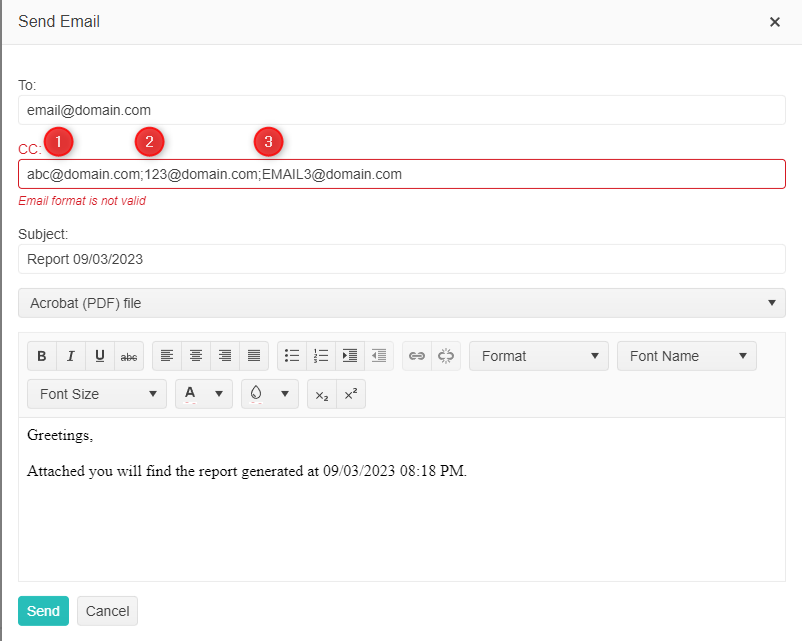
It would be lovely to be able to string multiple emails in the "To" and "CC" fields so users could email a batch of users at once. In my scenario there is an email distro group that needs to get a report when printed. I could write logic to pass multiple email accounts into the "CC" field, however, the functionality doesn't exist. Below is a visual example of what I'd like to achieve.
When designing reports with lots of parameters (which is very common for my usage), I often get error message "Missing or invalid parameter value" or "Syntax error in expression". I find it very time consuming and annoying to manually check "all" parameters in order to identify which one is causing the issue.

Would it be possible to include more details in these error messages, e.g. by including the name of the (first) incorrect parameter? Preferably for the message in report viewer / preview, but at least in the log file.
https://www.telerik.com/forums/missing-or-invalid-parameter-value-please-input-valid-data-for-all-parameters