
Recently Updated
Unplanned
Last Updated:
19 Mar 2024 18:22
by Erik Damgaard

Created by:
Erik Damgaard
Comments:
0
Category:
AutoComplete
Type:
Bug Report
Once the suggestions dropdown for RadAutoComplete is opened, If we click on the Hamburger icon , the suggestion dropdown does not dismiss at all.
Unplanned
Last Updated:
14 Mar 2024 11:06
by Jamison
Created by:
Jamison
Comments:
0
Category:
AutoComplete
Type:
Bug Report
If the AutoComplete is nested inside a modal Popup and Unfocus() is called on SuggestionItemSelected or Completed, the cursor/focus stays within the AutoComplete.
The same does not happen (the AutoComplete is properly unfocused) when the control is placed in MainPage.
Unplanned
Last Updated:
06 Mar 2024 13:35
by Jamison
Created by:
Jamison
Comments:
0
Category:
AutoComplete
Type:
Bug Report
When the AutoComplete is placed inside a modal popup, the dropdown can't be closed on WinUI when clicking outside.
Unplanned
Last Updated:
10 Jan 2024 14:42
by Steve
Created by:
Steve
Comments:
0
Category:
AutoComplete
Type:
Bug Report
If you have an AutoComplete control as the first element of the visual tree of the page, when you open a Popup control, the popup takes the focus and after closing the popup, the focus is set back to the AutoComplete - if there is text in the AutoComplete input, its SuggestionView is shown without user interaction with the control.
Unplanned
Last Updated:
20 Jul 2023 12:33
by ADMIN
Created by:
Aleksandra
Comments:
1
Category:
AutoComplete
Type:
Bug Report
when setting IsEnabled to false, the control is still enabled. It should be disabled. Works fine on Android and WinUI.
Declined
Last Updated:
01 Mar 2023 17:03
by ADMIN
Created by:
Ray
Comments:
2
Category:
AutoComplete
Type:
Bug Report
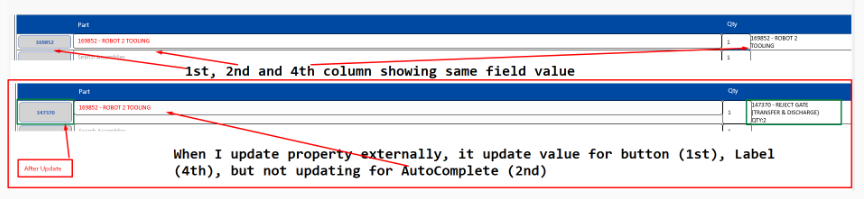
I am using RadAutoComplete inside DataGridTemplateColumn CellTemplate.
it loads data correctly when load first time, but when I update value, it not changing for AutoComplete
Unplanned
Last Updated:
23 Sep 2022 11:39
by Arkady
Created by:
Arkady
Comments:
0
Category:
AutoComplete
Type:
Bug Report
For example when adding input controls (entries) inside the NoResultsTemplate, I want to type in the entries but the focus is moved to the Autocomplete control. Same behavior with SuggestionView and SuggestionItem Templates
On macOS the focus is on the Entry inside the templates
On macOS the focus is on the Entry inside the templates