

Context: There is an item that illustrates the issue here: https://www.telerik.com/forums/kendo-datepicker-value-not-populated-after-refresh-firefox-only
In Firefox, when using the asp-for tag helper to bind a c# DateTime field to an input element, then calling kendoDatePicker() on that element, the control fails to populate on a soft-refresh (F5). Upon reloading using F5 in Firefox, the input's type is set to datetime-local, and the input 's control variation is changed to the default date picker. Then, the Kendo UI DatePicker is initialized with a blank input which normally has a type of text.
Example project and video of issue are attached.
This is the pertinent code (also happens in latest version of Kendo as well):
    public class IndexViewModel
    {
        public DateTime DateAsDateTime { get; set; }
    }
public IActionResult Index()
{
return View(new IndexViewModel { DateAsDateTime = DateTime.Today });
}@model IndexViewModel
<input id="dtDate" asp-for="@Model.DateAsDateTime">
<script type="text/javascript">
$(document).ready(function () {
$("#dtDate").kendoDatePicker();
});
</script>
I have a chat widget configured like this:
let chat = $(target).kendoChat({
			messages: {
        placeholder: ResourceManager.GetInstance().getResource("SR_TYPE_A_MESSAGE")
      },
      user: user,
      post: async (m: kendo.ui.ChatPostEvent) => await this.post(m),
    }).data("kendoChat");
If the post handler tries to await a call to a web service (to do some translation/tag substitution) then the message is posted to the chat and the results of the web call are ignored.

Bug report
If you have several Inline Editors and a Slider, switching focus from Slider and typing in the Editors result in an error in the console.
Reproduction of the problem
- Open this Dojo example - https://dojo.telerik.com/EhiKaJAw/2
- Change the Slider value
- Go to the Editor right below the slider and type some text - it appears that the focus is stolen here as the text cursor is not shown
- Go to the second Editor and type some text
- Repeat steps 2-4 several times
Current behavior
An error is thrown in the console
Expected/desired behavior
No error should be thrown on the console
Environment
- Kendo UI version: 2024.1.319
- Browser: [all]
multiline message is a basic feature that Kendo Conversational UI should have..
The current chat widget renders the user-input as an INPUT control, which means it cannot support multi-line support.
Wish for the option of rendering a TEXTAREA control instead of an INPUT for the chat widget:
Something like the following:
let chat = $(target).kendoChat({
  messages: {
        placeholder: ResourceManager.GetInstance().getResource("SR_TYPE_A_MESSAGE"),
        textarea: true
    },
      user: user,
      post: async (m: kendo.ui.ChatPostEvent) => await this.post(m),
    }).data("kendoChat");
Bug report
When the loaderType is set to skeleton and the user edit the cells in the Grid, when saving the Grid is displayed empty.
Reproduction of the problem
- Open the Dojo - https://dojo.telerik.com/@NeliK/AGATEWAR
- Edit a record and click the 'Save changes' button.
Current behavior
The Grid does not display any data. The Grid is displayed as expected when the default loaderType is set.
Expected/desired behavior
The updated data should be displayed
The issue is a regression introduced with 2024.1.319 version
Workaround - https://dojo.telerik.com/@NeliK/OyIXIHuJ
sync: function(e){
           $("#grid").data('kendoGrid').refresh()
 },
Environment
- Kendo UI version: 2024.1.319
- Browser: [all ]

The Kendo Spreadsheet is bound to a Kendo datasource, the datasource defines a schema, but when the JSON comes back the spreadsheet just ignores the schema properties and dumps the entire thing into the sheet.
It would be nice to not have to code up some additional workaround after already having defined the schema I want.
(No control over the JSON structure from the server)
Bug report
In a Grid with popup editing, saving/cancelling the changes shows hidden columns for a short time.
Regression with v 2023.2.829
Reproduction of the problem
- Open this Dojo example - https://dojo.telerik.com/icarOBim/6
- Open the browser console
- Edit a field and press the save button
Current behavior
The hidden ID column is shown for a short time
Expected/desired behavior
The hidden column should remain hidden
Environment
- Kendo UI version: 2023.3.1114
- Browser: [all]

I have noticed some weird behaviour when using the SwiftKey keyboard on Android.
To recreate:
- Install SwiftKey keyboard and enable
- browse to https://demos.telerik.com/kendo-ui/dateinput/index in chrome for android
- Select year component of date input control
- type 1 - year shows as 0001 - correct
- type 9 - year shows as 0019 - correct
- type 7 - year shows as 0009 - incorrect
- type 5 - year shows as 0019 - incorrect
All the other keyboard i have tried work as expected, i appreciate that this is a non standard keyboard on Android however it is a widely used one and works as expected when typing 1975 into any other app / control on the device.
Bug report
The following configuration works only on Chrome (and Chromium based Edge):
https://dojo.telerik.com/AFuJAWoN/12
Reproduction of the problem
The result on IE 11 and FF:
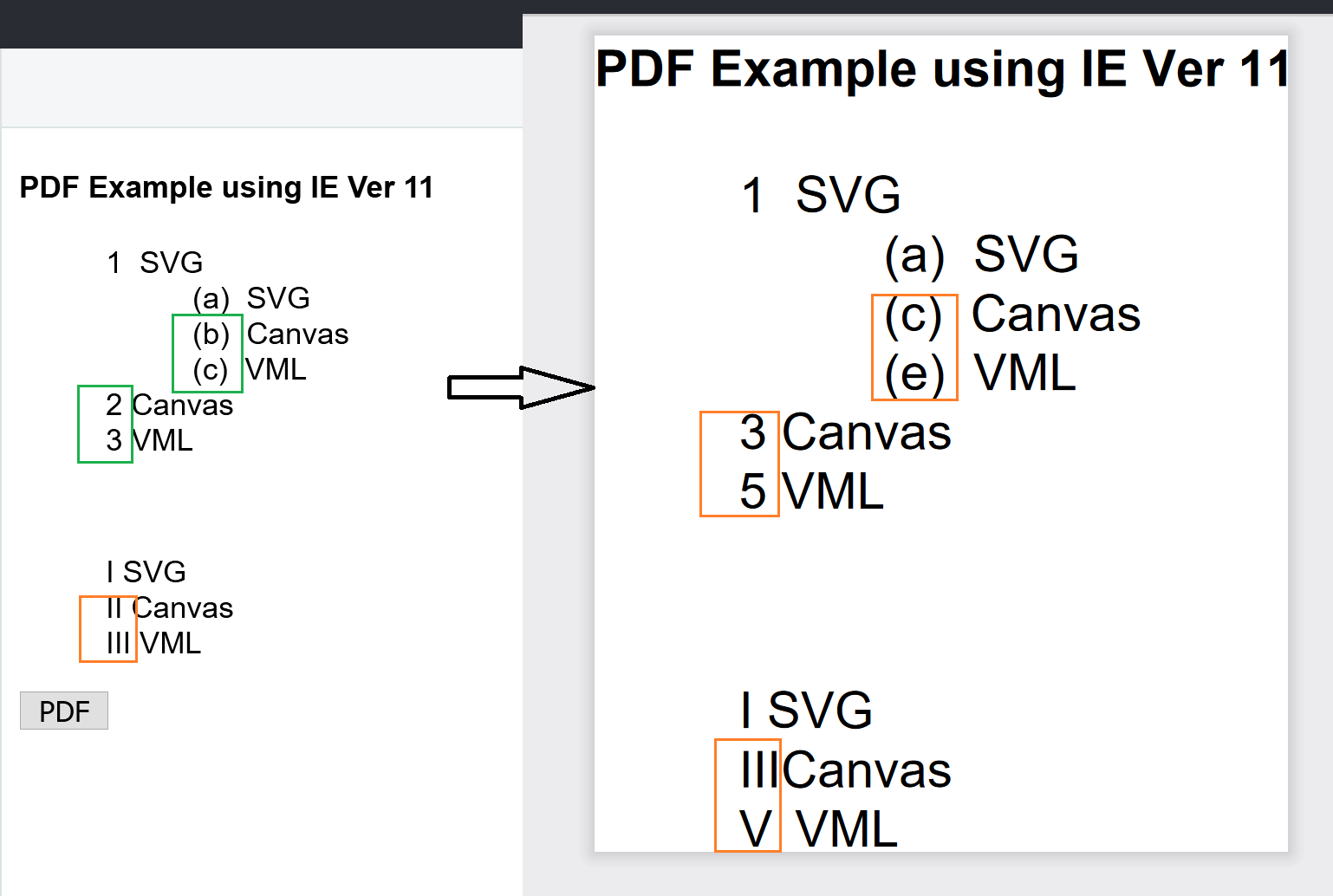

Bug report
Modified date value from Excel is not correctly updated when pasting in the Spreadsheet.
Regression introduced with 2023 R1
Reproduction of the problem
- Open this Dojo example - https://dojo.telerik.com/AZateGoC/6
- Copy the Spreadsheet content
- Paste in to an Excel file
- Change the date cell value
- Copy and paste back in the Spreadsheet
Current behavior
The updated date cell is not pasted in the Spreadsheet
Expected/desired behavior
The updated cell's value should be pasted in the Spreadsheet
Environment
- Kendo UI version: 2024.1.319
- Browser: [all]
I have an imageEditor component on my page, and am resizing the images to calculated width & height. I am using the ResizeImageEditorCommand command:
imageEditor.executeCommand({ command: "ResizeImageEditorCommand", options: { width: Math.round(newWidth), height: Math.round(newHeight), aspectRatio: true } });After resizing, some of the images seem 'flaky'. The is not reproducible with every image but can be observed with PNG and JPG as well. I have provided sample images in ticket ID: 1647561.
I would like the images in the ImageEditor to have the same quality after resizing.
Bug report
When the background tool is displayed in the overflow menu of the toolbar and the user tries to change the background color or text color an error: e[this._property] is not a function is thrown.
Reproduction of the problem
- Open the Dojo - https://dojo.telerik.com/@NeliK/IHaRIvoy
- Select a cell and try to change its background color or text color
Current behavior
An error e[this._property] is not a function is thrown and the background color is not changed.
Expected/desired behavior
There should be no error in the console and the color should be changed accordingly.
The issue is a regression starting with 2023.1.117 version
Environment
- Kendo UI version: 2024.1.319
- jQuery version: x.y
- Browser: [all | Chrome XX | Firefox XX | IE XX | Safari XX | Mobile Chrome XX | Android X.X Web Browser | iOS XX Safari | iOS XX UIWebView | iOS XX WKWebView ]
Bug report
Grid throws error when partial update is executed and selection is persisted
Reproduction of the problem
- Open the following dojo.
- Select a row.
- Place it into edit mode.
- Make some changes and click on the
Savecommand button. - Try to select another row.
Current behavior
The Grid throws an error when the partial update is executed and the selection is persisted.
Expected/desired behavior
The Grid should not throw an error when the partial update is executed and the selection is persisted.
Environment
- Kendo UI version: 2024.1.319
- Browser: [all]
Bug report
If you attempt to close a Kendo Window from a Dialog action, an error is thrown on the console.
Regression introduced with 2024.1.319
Workaround: https://dojo.telerik.com/afUPoQuX/3
Reproduction of the problem
- Open this Dojo example - https://dojo.telerik.com/afUPoQuX/2
- Open the browser console
- Click the OK action
Current behavior
An error is thrown on the console
Expected/desired behavior
No errors should be thrown
Environment
- Kendo UI version: 2024.1.319
- Browser: [all]
- Currently, when the legend has a lot of items or the labels are too long, it will create multiple lines and takes spaces. We would like to keep the legend in one line as fixed and add a scrollbar within the legend.
- This will make the chart more clean and the legend wont overtake the space of the chart and it will remain the same size no matter how many items it contains.
Bug report
In a navigatable Grid with a custom ComboBox cell editor, clicking the clear button closes the cell instead of clearing the value in the ComboBox.
Regression introduced with 2023.2.606
Reproduction of the problem
- Open this Dojo example - https://dojo.telerik.com/OgEBOGoz/2
- Edit a cell
- Click the ComboBox clear button
Current behavior
The cell exits the edit mode when the button is clicked and the value is not cleared
Expected/desired behavior
The cell should remain in edit mode and the value should be cleared
Environment
- Kendo UI version: 2024.1.319
- Browser: [all]